Security model
Docker Sandboxes run AI agents in microVMs so they can execute code, install packages, and use tools without accessing your host system. Multiple isolation layers protect your host system.
Trust boundaries
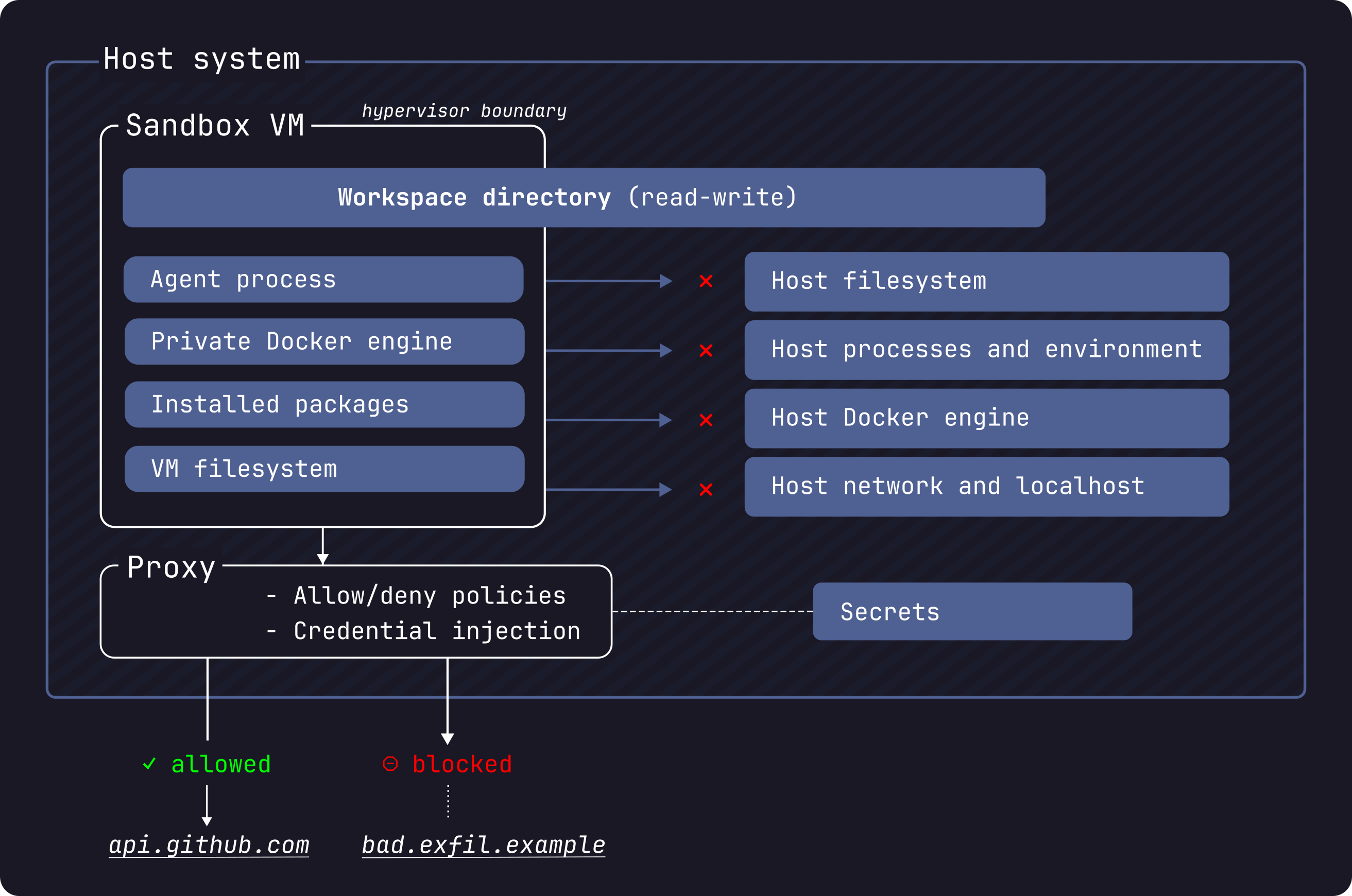
The primary trust boundary is the microVM. The agent has full control inside the VM, including sudo access. The VM boundary prevents the agent from reaching anything on your host except what is explicitly shared.
What crosses the boundary into the VM:
- Workspace directory: mounted into the VM with read-write access. With the default direct mount, changes the agent makes appear on your host immediately.
- Credentials: the host-side proxy injects authentication headers into outbound HTTP requests. The raw credential values never enter the VM.
- Network access: HTTP and HTTPS requests to allowed domains are proxied through the host.
What crosses the boundary back to the host:
- Workspace file changes: visible on your host in real time with the default direct mount.
- HTTP/HTTPS requests: sent to allowed domains through the host proxy.
Everything else is blocked. The agent cannot access your host filesystem (outside the workspace), your host Docker daemon, your host network or localhost, other sandboxes, or any domain not in the allow list. Raw TCP, UDP, and ICMP are blocked at the network layer.
Isolation layers
The sandbox security model has four layers. See Isolation layers for technical details on each.
- Hypervisor isolation: separate kernel per sandbox. No shared memory or processes with the host.
- Network isolation: all HTTP/HTTPS traffic proxied through the host. Deny-by-default policy. Non-HTTP protocols blocked entirely.
- Docker Engine isolation: each sandbox has its own Docker Engine with no path to the host daemon.
- Credential isolation: API keys are injected into HTTP headers by the host-side proxy. Credential values never enter the VM.
What the agent can do inside the sandbox
Inside the VM, the agent has full privileges: sudo access, package installation, a private Docker Engine, and read-write access to the workspace. Installed packages, Docker images, and other VM state persist across restarts. See Default security posture for the full breakdown of what is permitted and what is blocked.
What is not isolated by default
The sandbox isolates the agent from your host system, but the agent's actions can still affect you through the shared workspace and allowed network channels.
Workspace changes are live on your host. The agent edits the same files you
see on your host. This includes files that execute implicitly during normal
development: Git hooks, CI configuration, IDE task configs, Makefile,
package.json scripts, and similar build files. Review changes before running
any modified code. Note that Git hooks live inside .git/ and do not appear in
git diff output. Check them separately.
See Workspace trust.
Default allowed domains include broad wildcards. Some defaults like
*.googleapis.com cover many services beyond AI APIs. Run sbx policy ls to
see the full list of active rules, and remove entries you don't need. See
Default security posture.
Learn more
- Isolation layers: how hypervisor, network, Docker, and credential isolation work
- Default security posture: what a fresh sandbox permits and blocks
- Credentials: how to provide and manage API keys
- Policies: how to customize network access rules
- Workspace trust: what to review after an agent session